How To Enable Run Command On Windows 7 Start Menu

Most windows 7 user get in this trouble anytime.it's they can't find Run command on Windows 7 start menu.but we can get Run command on start menu forever.if you want get it on your start menu, 
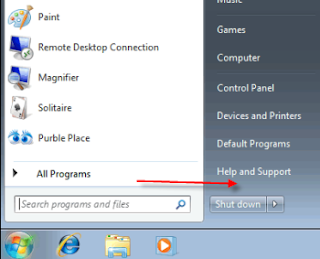

Follow This Simple Steps Below.

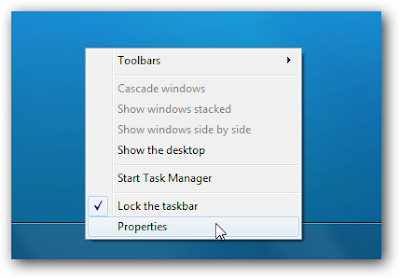
Step = 1. Right Click on The Task bar
Step = 2. Select properties
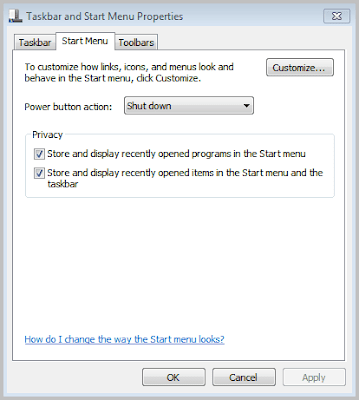
Step = 3.  Now in the Taskbar and Start Menu Properties dialogue box is open. Now Click the Start Menu tab and then click on the Customize button
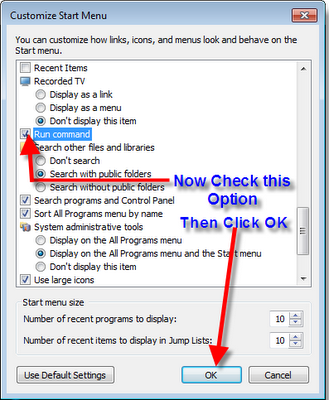
Step = 4 .  After click on Customize a popup window is open. Scroll down this window and Scroll down find the Run command option ( The options are listed in alphabetical order ) then tick the check box and Click OK button.
Step = 5.   Now click Apply button on the Taskbar and Start Menu Properties windows and then click OK to Finish this.
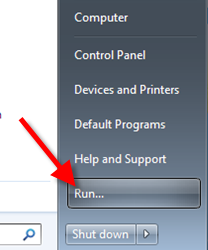
Click the Start Menu  => Run Command is now available on the Start Menu like Windows XP.
You Done. 

Enjoy....

DxO Optics Pro 6

DxO Optics Pro - professional program for the improvement and adjustment of your collection of digital photos. This decision has many advanced technologies, with which you can adjust the brightness, contrast, color balance, eliminate distortion and improved clarity of images, correct color and exposure on the edges and corners of the photos, adjust white balance, taking into account the color temperature and more. The principle of DxO Optics is based on the projects. You load a set of photos from your hard drive, flash-cards or any other medium, then sistematiziruete material describing the necessary adjustments. In addition, DxO Optics Pro can be connected as a plug-in graphics editor Adobe Photoshop 

Password = mohamedazh
Size = (104 MB)
After click Download button Check top right side. Wait 5 Seconds and Click SkipAd button to Download Software See below image Example
If any Problem In Download Please Lave a Comment Below ( Your Comments are Valuable)